On this page08
Dead stock is stock that has stopped selling: products that are on the shelf, still listed, and have not sold in 90 days or more. It is easy to miss, because nothing breaks. In the example store we use for this post, 89 of 985 products in stock had not sold in 90 days. Together they held €192,613 at cost: 9.2% of everything on the shelves.
This guide shows how to find dead stock from your own order history in about ten minutes, first with a spreadsheet and then in Stokis. It also puts a price on keeping it and gives a next step for each product. The numbers and screenshots come from the Stokis demo workspace: a supplements shop with 75 suppliers and two years of simulated sales, measured on 6 October 2026. It is example data, not a customer's.
What counts as dead stock
Every definition of dead stock comes down to one question: how long since this product last sold? Not "how much did it sell", because a slow seller still sells. A product that moves two units a month is slow. A product that has not moved since April is dead.
Stokis sorts in-stock products into two bands by days since the last sale. Hover or tap the dotted terms for the detail.
| Band | Rule | In the example store |
|---|---|---|
| Aging | In stock, no sale for 60 to 89 days | 2 products, €3,228 |
| Dead | In stock, no sale for 90 days or more | 89 products, €192,613 |
| Never sold | Aged from the day it was listed | 0 products |
| Not counted | Out of stock, or disabled in the store | — |
Why 60 and 90 days? Ninety days is long enough that a quiet week or a late payday cannot explain it, and short enough that the stock can still be sold at a fair price. Sixty days gives you a month of warning before that. Neither number is a law. A shop selling Christmas decorations should use longer windows for that range, and we show how further down.
Quick takeaway: dead stock is measured in days since the last sale, not in units sold. In stock, still listed and no sale in 90 days means dead. 60 days means it is time to watch it.
How much dead stock costs you to keep
The obvious cost is the money you paid for it. The less obvious cost is what you pay every month to keep it: the cash you could have used elsewhere, the shelf space, insurance, handling, items that get damaged or expire. Together these are called carrying cost.
APQC's open benchmark puts the median carrying cost at 10% of inventory value per year, across 6,468 companies. That is a conservative figure; it counts realised costs rather than a full cost of capital. Applied to the example store's dead stock, 10% of €192,613 is about €19,300 a year, or €1,600 a month, for products that are not selling.
The chart below splits the example store's idle stock by how long it has sat. Blue is the cash tied up at cost. Orange is the carrying cost already paid on it since the last sale, at the same 10% a year. Hover over the bars for the detail.
Two things stand out. Most of the money sits in the 180 to 364 day band: 59 products and 63% of the dead stock cash. That is where the decisions are. And the older the band, the more of its value has already gone on keeping it: 2% for stock idle two months, 11% for stock idle more than a year. Waiting is not free, and it is not neutral either, because the price you can sell it for falls too.
Quick takeaway: budget around 10% of the value of your dead stock per year just to keep it. In the example store that is €1,600 a month, most of it on products that last sold six to twelve months ago.
Find dead stock in ten minutes with a spreadsheet
You do not need software to do this once. You need two exports from your store and four columns. Any shop on PrestaShop, WooCommerce, OpenCart or Shopify can produce both files.
- Export your products with SKU, stock on hand, cost price and the date each product was created. Put it on a sheet called Products.
- Export your order lines for at least the last twelve months, one row per product per order, with SKU and order date. Keep only paid and shipped orders; cancelled and refunded ones are not sales. Put it on a sheet called Orders.
- Add the four columns below to the Products sheet and copy them down.
- Filter to stock above zero and days since last sale of 90 or more, then sort by cash tied up, largest first. That list is your dead stock.
| Column | Formula | What it does |
|---|---|---|
| E: Last sale | =MAXIFS(Orders!B:B, Orders!A:A, A2) | Latest order date for this SKU |
| F: Counted from | =IF(E2=0, D2, E2) | Created date when it never sold |
| G: Days since | =TODAY()-F2 | Days since the last sale |
| H: Cash tied up | =B2*C2 | Stock on hand times unit cost |
Three traps catch most people. Variants first: if your store sells sizes or colours, export at the variant level, because a T-shirt that sells in medium can be dead in XXL. Then missing cost prices, which make expensive products look free. Then the never-sold case in column F.
That last one caught us too. On 4 August 2026 we connected three real PrestaShop stores to Stokis and all three reported zero dead stock, despite about 40,000 products between them that had never sold. Stokis was ageing never-sold products from the day they were imported into Stokis, so a product listed five years ago looked brand new for 60 days. The fix, shipped the same day, counts from the date the product was created in the store, which is what column F does.
Quick takeaway: two exports, four columns, one filter. Count never-sold products from the day they were listed, and export variants separately, or the spreadsheet will tell you everything is fine.
Find dead stock in Stokis
The spreadsheet is a snapshot; by next month it is out of date. Stokis works out the same list from your latest sync every time you open it. These are the steps, with the screens you will see.
Step 1: connect your store
Stokis imports your products, stock, cost prices and order history. Follow the PrestaShop setup guide, the WooCommerce setup guide or the OpenCart setup guide. The first import takes a few minutes, and the dead stock check needs nothing else.
Step 2: check the thresholds
Go to Settings, then Forecast, and find Dead-stock thresholds. The defaults are 60 days for aging and 90 for dead. Change them if your products naturally sell slowly, such as furniture or spare parts.
Step 3: give seasonal ranges longer windows
A product that sells only in winter is not dead in July. If one supplier makes your seasonal range, open that supplier's settings and set its own thresholds under Agent overrides. Below, a supplier set to 120 and 180 days, with Reset to go back to the workspace default.
Step 4: open the idle inventory view
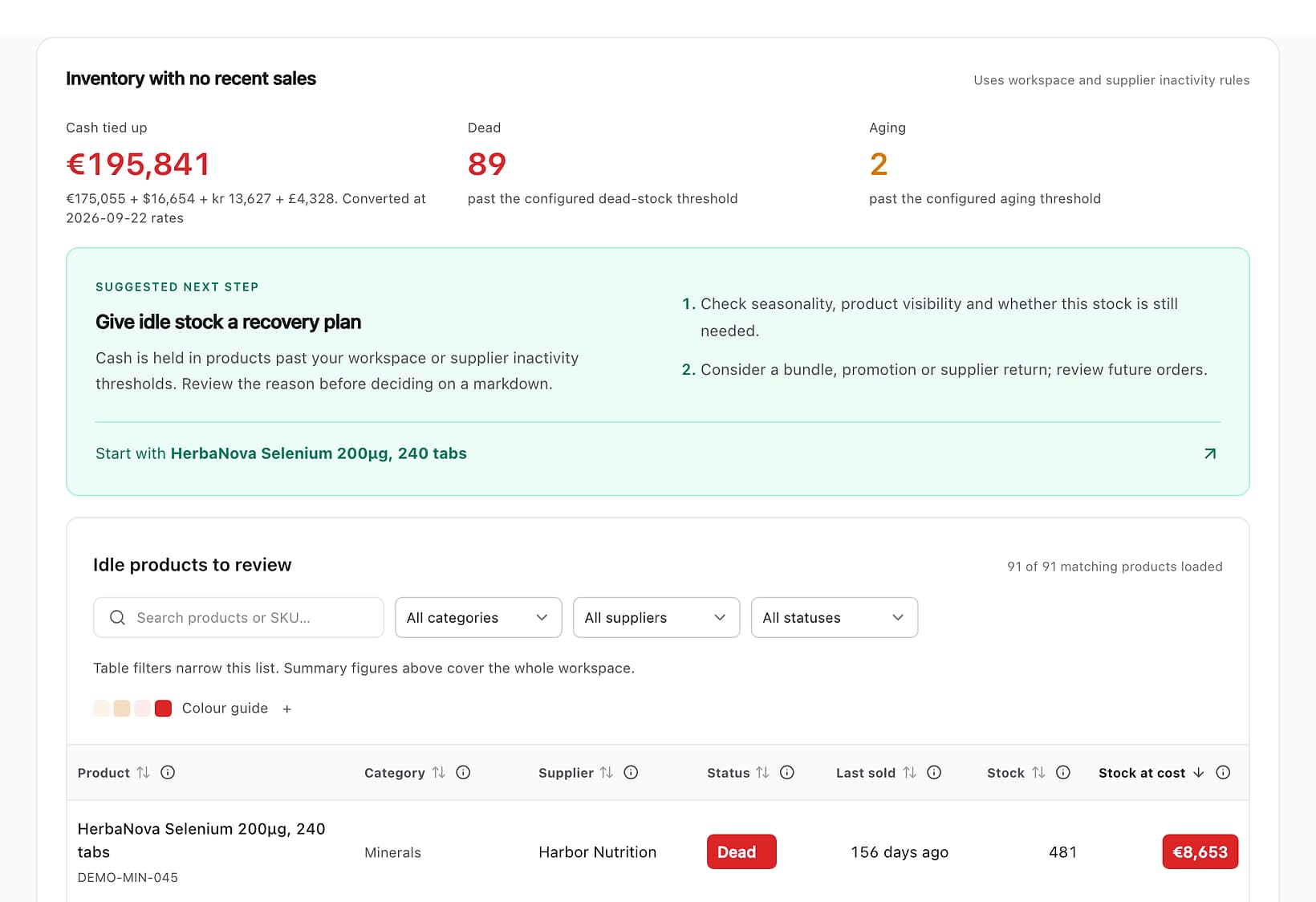
Go to Sales, open Revenue at risk, and pick Idle inventory. At the top you get the cash tied up, converted into your currency when suppliers bill in several, and the number of dead and aging products. Below it, the products ranked by cash at cost, with a suggested place to start.
Step 5: work through the list
Stats, then Operations, then Inventory, shows the same products in a table you can sort by days since sale, filter by category and search by supplier. Open any product to see its sales history before you decide.
What to do with each dead product
Finding dead stock is the easy half. Each product needs its own decision, and the right one depends on why it stopped selling. Here are the six largest in the example store, with what we would try first. Hover for the reasoning.
| Product | Last sold | Stock | At cost | First step |
|---|---|---|---|---|
| Selenium 200µg, 240 tabs | 3 May 2026 | 481 | €8,653 | Ask the supplier for a return |
| Probiotic powder, 200 g | 23 June 2026 | 331 | €7,825 | Check the listing first |
| Vitamin D3 drops, 30 ml | 5 November 2025 | 368 | €7,169 | Mark down before winter |
| Kids iron, 60 gummies | 18 April 2026 | 373 | €7,074 | Bundle with a best seller |
| Vitamin K2 + D3, 120 caps | 21 November 2025 | 293 | €7,053 | Discount, then clear |
| Milk thistle 300mg, 60 caps | 5 December 2025 | 316 | €6,747 | Check expiry dates |
The options, roughly in the order worth trying:
- Stop reordering it. Free, immediate, and the step most often missed. Make sure no minimum stock level or standing order brings more in.
- Fix the listing. If sales stopped suddenly, the cause may be on the product page, not in demand.
- Return or swap with the supplier. Easier with a supplier you still buy from, and easier the sooner you ask.
- Bundle it with a product that sells, so it moves at full price inside a deal.
- Mark it down, in steps, and give each step two to four weeks.
- Clear it through a marketplace, an outlet or a clearance buyer, at a price that frees the cash.
- Donate or write it off. The tax treatment depends on your country, so talk to your accountant before you do.
Quick takeaway: start with the products holding the most cash, find out why each one stopped, and stop reordering all of them today. A discount is one option of seven, not the default.
What Stokis does not do with dead stock
Knowing the limits saves you looking for something that is not there.
- It does not change anything in your store. No price changes, no unlisting, no bundles; those decisions stay with you.
- Products without a cost price are counted but not valued, and the view tells you how many there are.
- Thresholds are set per workspace and per supplier, not per product or category yet.
- If your store's sync stalls, every product drifts toward "dead". Stokis shows a warning with how many days the sales data is behind instead of reporting the whole catalogue as stuck.
- Dead stock flagging is on the Growth and Scale plans and in the free trial. On the Free plan the view is locked.
If you also make some of what you sell, the same idle view covers your own products. Our post on production lead time for makers shows how Stokis plans stock you produce. Every release, including the one that added dead stock flagging, is in the changelog.
Frequently asked questions
How many days without a sale makes stock dead?
Ninety is the most common rule and the Stokis default, with 60 days as an early warning. Slow-moving categories such as furniture or spare parts often use 180 days. What matters is choosing one rule and applying it every month.
Is dead stock the same as obsolete inventory?
Not quite. Dead stock has stopped selling but could still sell: the product is fine, the demand is not there. Obsolete inventory can no longer be sold as it is, because it expired, was replaced by a new model or no longer meets a rule. Dead stock becomes obsolete if you wait long enough.
Should I write dead stock off?
Only after you have tried to sell, return or bundle it, and only with your accountant. A write-off reduces the value on your books, but it does not bring back any cash, and the rules differ by country.
Does seasonal stock count as dead stock?
Out of season, it can look that way. Give the suppliers of seasonal ranges longer thresholds, and judge seasonal products against last season: if it missed its own season, as the vitamin D3 drops in our example did, it is dead.
Find the dead stock in your own store
Connect your store and Stokis finds your dead stock from the order history you already have, with the cash tied up in each product. Start with the PrestaShop or WooCommerce setup guide. The first 30 days include every Growth feature, with no card. See the pricing page for what comes after.