On this page09
Every reorder tool asks the same first question: how long does your supplier take? If you make what you sell, the honest answer is "as long as we take." You do not have a supplier lead time. You have a production lead time: the days it takes to make a batch, plus the days it takes to get the finished goods onto the shelf. Stokis now plans on exactly that number, for every product you make, on every plan including the free one.
This guide shows what a production lead time is, why it moves your reorder points more than you would guess, how to set it in Stokis in four steps, and what changes downstream once it is in. The numbers and screenshots come from a small candle workshop we set up in Stokis for this post: thirteen products, fourteen months of sales, one production source.
What a production lead time is
A reseller's lead time is one number: the days between placing an order and receiving it. A maker's lead time has two parts, and only one of them is about moving boxes.
- Production time is how long a batch takes to make. For a candle studio that is pouring, curing and labelling: five days for a standard jar, twelve for a boxed gift set.
- Transit time is how long finished goods take to reach the place where stock is counted. Often zero, because the workshop and the shelves share a building. Sometimes a day or two to a fulfilment partner.
Stokis stores both and adds them up. The production time lives on the product, with a default on your production source, and the transit time lives on the source. Hover over the bars below to see how the two parts stack for the workshop's products.
The split matters because the two halves are owned by different people. The workshop knows the production time. Whoever runs the warehouse knows the transit. Keeping them separate means each figure stays honest, and the total stays right when one of them changes.
Quick takeaway: production lead time = days to make a batch + days to get it on the shelf. Stokis asks for both once and adds them up for every product you make.
Why the reorder point moves when you make things
A reorder point is the stock level at which you must start the next batch so it lands before the shelf is empty. The classic form is expected demand over the lead time plus a safety margin. Stokis also adds a review period, so the batch covers you until the next time it looks, and sizes the safety pad from how jumpy your demand actually is.
Every term in that formula is multiplied by the lead time. Get the lead time wrong by a week and the reorder point is wrong for every product, in the same direction, all year. For a maker who leaves the production lead time at a supplier-style "one day", the tool thinks a batch can appear overnight. It will tell you to start production far too late.
Here is the workshop's catalogue after the production lead time went in. Hover or tap the dotted figures for the reasoning behind each one.
| Product | Sold per day | Production | Transit | Lead time | Reorder point | Stock |
|---|---|---|---|---|---|---|
| Fjord soy candle 220 g | 4.4 | 5 | 1 | 6 | 219 | 272 |
| Birch & moss candle 220 g | 2.5 | 5 | 1 | 6 | 143 | 54 |
| Sea salt candle 500 g | 1.6 | 8 | 1 | 9 | 97 | 20 |
| Taper candles, pair | 2.3 | 3 | 1 | 4 | 129 | 233 |
| Amber wax melts, box of 6 | 4.2 | 2 | 1 | 3 | 130 | 189 |
| Gift set, three candles | 0.9 | 12 | 1 | 13 | 55 | 28 |
| Reed diffuser cedar 100 ml | 1.1 | 6 | 1 | 7 | 41 | 57 |
| Travel tin fig 90 g | 2.7 | 5 | 1 | 6 | 87 | 69 |
Read the gift set row twice. It sells less than one unit a day and has 28 in stock, which sounds like a month of cover. Thirteen of those days are production. Stokis flags it, because by the time the shelf looks low there is no time left to make more. That is the whole point of a production lead time: it turns "we have plenty" into "we have plenty for exactly 19 more days."
What a wrong production lead time costs
A lead time can be wrong in two directions, and each one has a price. Too short, and batches start late: the shelf empties while the workshop is still pouring. Too long, and every reorder point carries extra units that sit at cost for the whole year. The workshop's own figures put money on both.
| Product | Sales lost per day out | One missed cycle |
|---|---|---|
| Fjord soy candle 220 g | EUR 106 | EUR 634 |
| Sea salt candle 500 g | EUR 67 | EUR 605 |
| Gift set, three candles | EUR 51 | EUR 667 |
The other direction is quieter. Suppose the studio skipped the per-product figures and padded every product with a blanket "safety week" instead. Each reorder point rises by seven days of demand. Across the thirteen products that is about EUR 1,060 at cost parked on the shelf, permanently, earning nothing. The dashboard already shows this workshop holding 31% of its inventory value in four overstocked products. A guessed lead time makes that number bigger, not smaller.
We learned the same lesson on our own planning surfaces this month. On the three PrestaShop stores connected to our development workspace, 98 of every 100 products had no supplier lead time set at all, so they were planned on a default. Our surfaces did not even agree on that default: the forecaster assumed seven days, the dashboard and the audit report assumed fourteen. Aligning them to one resolver moved the stockout count on every connected store. The fix was one function; the lesson is that the lead time is the one number every other number depends on, so it deserves a real value, not a placeholder.
Quick takeaway: a lead time that is too short costs you sales for the length of a production cycle; one that is too long costs you cash for the length of a year. The production lead time is the cheapest number in the business to get right.
Set up your production lead time in Stokis
Four steps, about five minutes. Nothing here needs an import or a spreadsheet.
1. Tell Stokis what your business does
When you create a workspace, one new question asks what your business does. Pick We make what we sell if everything is made in-house, or Both if some products are bought in and some are made. Resellers keep the default.
Choosing a maker option creates your own production as a source, named after the workspace. It is the thing Stokis will address orders to, the same way it would address a supplier. There is no separate module to learn.
2. Set the default production time and the transit
Open Settings, then the Forecast tab. A Production section shows two fields: the default production time, and the transit from the workshop to where stock is counted. Enter the numbers that are true for most of your products. The workshop in this post makes a typical batch in five days and moves it to a shelf next door in one.
Those fields edit your production source directly. You can also open it from the Suppliers page, where its kind reads "Own production" and the lead time field is labelled as transit. A hybrid business adds external suppliers next to it as usual, and can turn any supplier into a production source by changing its kind.
3. Override the production time per product
Most catalogues have a few products that take much longer than the rest. Open the product, go to the Suppliers tab, and edit the pairing with your production source. The production time you enter there wins over the default, and the lead time figure at the top shows the sum.
4. Let the forecaster run
Stokis recomputes forecasts once a day per workspace. From the next run, every reorder point, every stockout warning and every draft order uses the production lead time. You do not have to touch any other setting.
What changes downstream
The lead time is the spine of Stokis. Demand forecast, reorder point, stockout risk, draft orders and the expected delivery date all hang off it, so one honest number changes all of them at once.
| Surface | Resellers | Makers |
|---|---|---|
| Lead time used everywhere | Supplier delivery time | Production time + transit |
| Reorder point | Demand over delivery and review, plus a safety pad | Same formula, longer horizon |
| Draft orders | Purchase order to the supplier | Order to your own workshop |
| Expected date on the order | Sent date + delivery time | Created + production + transit |
| Dashboard stock cover | Days of cover against delivery time | Days of cover against the full lead time |
| Sync fallback | Unbranded products go to a default supplier | Imported products point at your workshop |
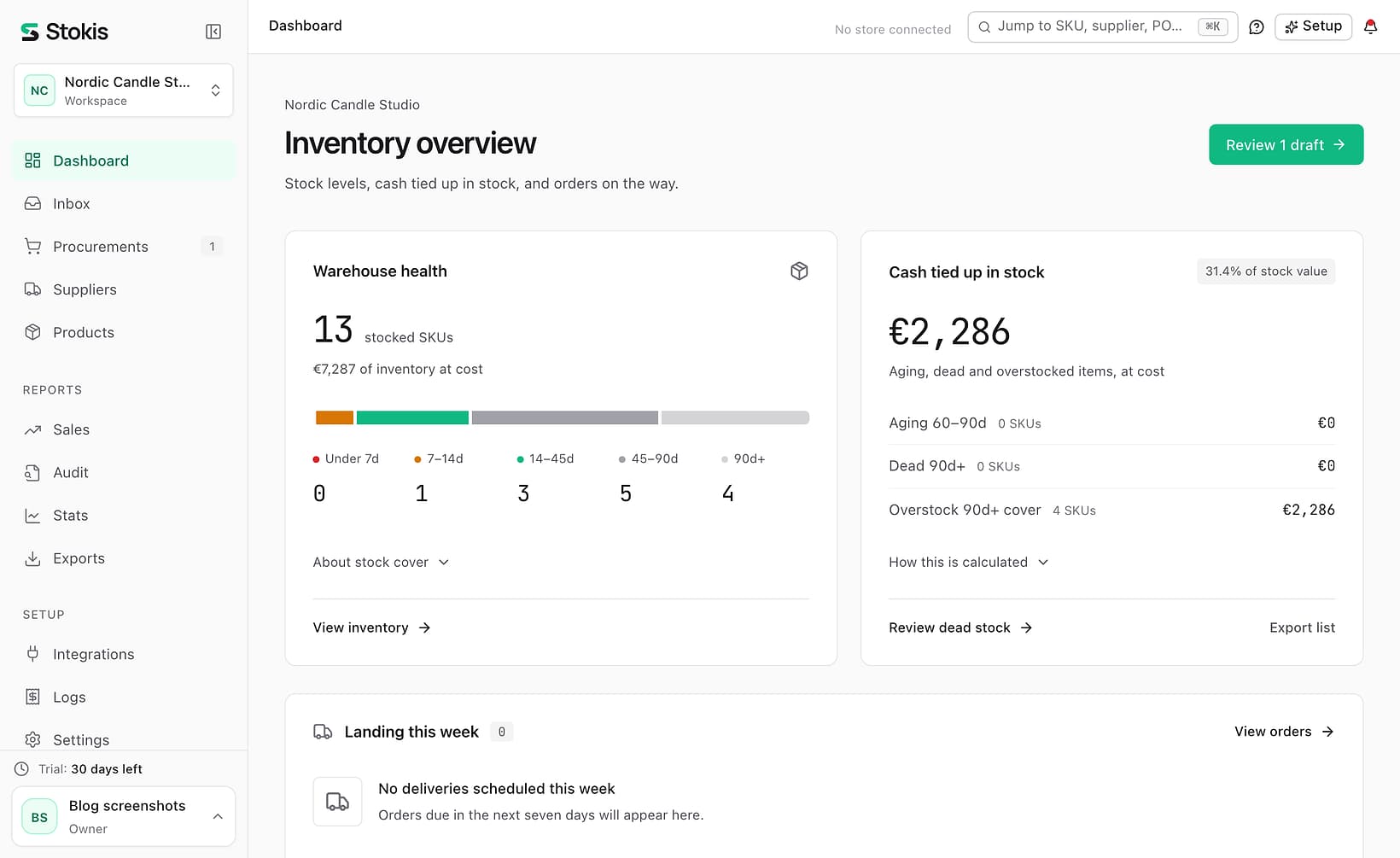
Two of those rows are worth seeing. The dashboard groups stock by days of cover, and with production in the lead time the buckets mean what a maker thinks they mean.
That draft is the sea salt candle. Stock was 20 against a minimum of 25, so the agent drafted a production order for 89 units, enough to cover the next month plus the lead time, and dated it nine days out: eight days of curing and a day of transit. It waits for your review; Stokis never sends anything you have not approved.
Make-to-order suppliers get the same field
If you resell but one of your suppliers makes to order, you have the same problem in a smaller coat. Their quoted delivery is shipping only; the three weeks before it are production. Open that supplier's settings and fill in the production time field. From then on their lead time is the sum, their reorder points move out, and you stop discovering the three weeks the hard way.
Quick takeaway: production time is a property of the source, not of the business model. Makers set it on their own workshop; resellers set it on the suppliers that make to order.
What is next for makers
This release makes the planning engine honest for made goods. It does not yet change the words: a draft to your workshop is still called a purchase order in most places, and the send step still expects an email address on the source. The next release renames those surfaces by the kind of source, so a maker reads "production order" and "started" where a reseller reads "purchase order" and "sent".
Two bigger pieces are deliberately not built yet, because we want a real workshop to shape them. A bill of materials, so a finished good's forecast becomes component demand and components reorder from external suppliers through the pipeline that already exists. And capacity, a units-per-day ceiling on the source that caps a batch or stretches its lead time. If your business needs either, tell us which one first.
Frequently asked questions
Is the production lead time available on the free plan?
Yes. The business question, the production source and the production time fields are on every plan. See the pricing page for what the paid tiers add on top.
Can every product have a different production time?
Yes. The source holds the default production lead time and any product can override it on its Suppliers tab. Products that do not override inherit the default, so a change to the default reaches them all.
Our workshop and warehouse are the same building. What transit do we enter?
Zero. Stokis treats a zero as a real answer, not a missing one, so the production lead time becomes the make time alone.
We did not pick a maker option when we created the workspace. Can we still do this?
Yes. Add a supplier for your own production and set its kind to "Own production". Point the products you make at it, and set the production time on it or on each product.
Start with your real numbers
Connect your store, and Stokis imports your products and sales history in minutes. Follow the PrestaShop setup guide or the WooCommerce setup guide, answer the business question, enter your two numbers, and the next forecast run plans your stock on a production lead time instead of a guess. The first 30 days are free with no card.