On this page08
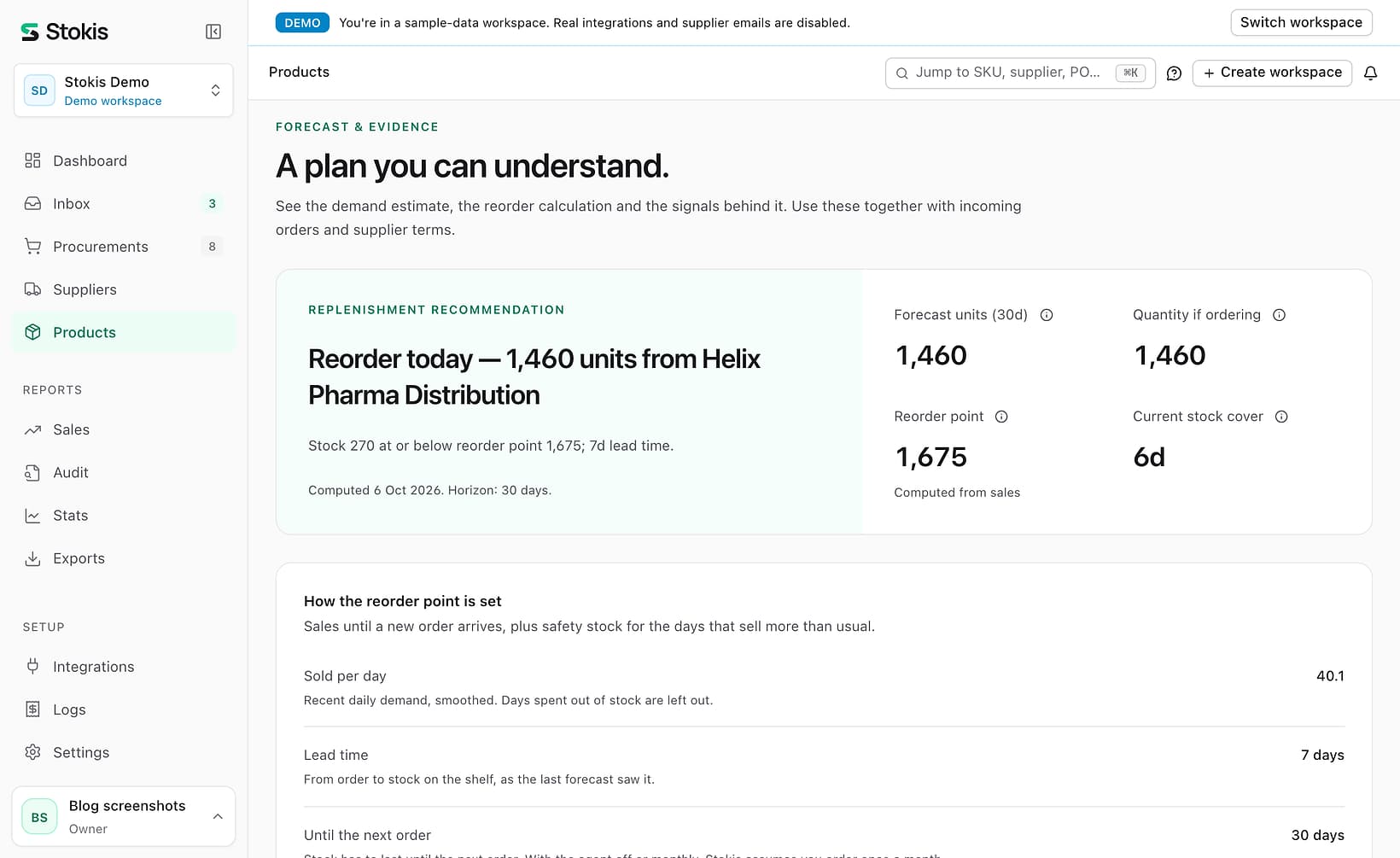
The reorder point formula is: reorder point = daily sales × (lead time + days until your next order) + safety stock. When stock falls to that number, you order. For a product that sells 40 a day, arrives 7 days after you order and is reordered once a month, that is 40.1 × 37 days + 192 units of safety stock = 1,675 units. The textbook version leaves out the "days until your next order", and for that product it would tell you to order at about 410. That is roughly a month too late.
This guide takes the formula apart, shows why the version most guides give comes out too low for anyone who does not order every day, and applies it to eight real products instead of one. It also covers the setting that quietly overrides the whole calculation in most stores. The numbers and screenshots come from the Stokis demo workspace: a supplements shop with 75 suppliers and two years of simulated sales, measured on 6 October 2026. It is example data, not a customer's.
The reorder point formula, part by part
A reorder point has to answer one question: how much stock do I need to get through until the next delivery lands? Not the delivery you are about to order, but the one after that, because once you have checked today you will not look again until your next ordering day. That gives the formula three inputs and one margin.
| Part | What it means | Example |
|---|---|---|
| Daily sales | Units sold per day, recently | 40.1 |
| Lead time | Days from placing an order to stock on the shelf | 7 days |
| Review period | Days until you next place an order | 30 days |
| Safety stock | Extra units for days that sell more than usual | 192 |
Put together: 40.1 a day for 7 + 30 = 37 days is 1,483 units. Add 192 of safety stock and the reorder point is 1,675. The safety stock grows with how much daily sales jump around, not with how much the product sells. This product swings by about 19 units a day around its average of 40, so it needs a lot of safety stock.
Quick takeaway: reorder point = daily sales × (lead time + review period) + safety stock. The review period is the part most guides leave out, and it is often the biggest number in the brackets.
Why the textbook reorder point formula comes out too low
The formula on most glossary pages, including Wikipedia's, is daily sales × lead time + safety stock. It is correct for a shop that checks stock every day and orders the moment a product crosses the line. Hardly any small shop works like that. Most order on a rhythm: every Monday, every other week, or when the supplier's monthly order goes out.
If you check on Monday and a product is just above its reorder point, you will not order it until next Monday. Those seven days of sales have to come out of stock you already have. So the stock has to cover the lead time plus the wait until your next ordering day. The chart shows how much that changes the number for six products from the demo store.
Ordering monthly instead of daily makes the reorder point roughly three times higher, and up to four times for the fastest seller. That is not padding. It is the stock you will sell while you wait for your next ordering day, and without it the shelf runs empty a week or two before the delivery arrives.
Across the demo store, 740 products have enough sales history for a computed reorder point. On 6 October, 45 of them were at or below it when we used a daily rhythm, 73 with a weekly one and 229 with a monthly one. A longer rhythm means fewer, bigger orders, and more products crossing the line on each ordering day.
Quick takeaway: if you order weekly, add 7 days to the lead time in the formula. If you order monthly, add 30. Skipping it is the most common reason a "correct" reorder point still runs out.
The reorder point formula applied to eight products
Here is the whole formula worked out for eight products, with the demo store's monthly rhythm. Two pairs are worth comparing. The protein bar and the marine collagen sell almost the same amount, 8.2 and 8.3 a day, with the same 7-day lead time. But the protein bar's daily sales swing six times as much, so it needs 111 units of safety stock against 19.
| Product | Per day | Lead | Until delivery | Safety | Reorder point | In stock |
|---|---|---|---|---|---|---|
| Kids multivitamin | 40.1 | 7 | 1,483 | 192 | 1,675 | 270 |
| BCAA, box of 12 | 23.7 | 12 | 997 | 66 | 1,063 | 92 |
| MSM 1000mg | 14.1 | 12 | 594 | 94 | 688 | 428 |
| Cod liver oil | 10.6 | 16 | 486 | 36 | 522 | 0 |
| Zinc picolinate | 12.5 | 7 | 464 | 44 | 508 | 156 |
| Multivitamin, 60 caps | 11.8 | 8 | 449 | 41 | 490 | 310 |
| Protein bar | 8.2 | 7 | 304 | 111 | 415 | 320 |
| Marine collagen | 8.3 | 7 | 306 | 19 | 325 | 237 |
All eight are at or below their reorder point, so on a monthly rhythm all eight go into this month's orders. With a weekly rhythm, the MSM, the 60-capsule multivitamin, the protein bar and the collagen would wait another week. That is the review period at work again: order more often and you can hold less.
The other lesson is in the safety stock column. A single blanket rule such as "keep two weeks extra" would give the protein bar too little and the collagen far too much. Safety stock should come from how much each product's sales move, and that is something only your own order history can tell you.
Min stock vs reorder point: which one triggers the order?
Many stores and plugins have a field called min stock, minimum stock or low stock threshold. When it is filled in, it usually becomes the trigger and the calculation above is ignored. Stokis works the same way: a min stock you type in wins over the computed reorder point, because a number someone typed on purpose should not be overruled silently.
In practice, almost nobody types one in. Across the three PrestaShop stores connected to our development environment, 0 of 53,643 products have a min stock, and none of their 159 suppliers has a lead time filled in (we checked on 6 October 2026). That is why Stokis computes the reorder point instead of waiting for one. The trouble starts with the stores that do set a min stock, usually once, years ago, and never again.
To show what that costs, we gave 16 fast sellers in the demo store a min stock set too low, at half of what they sell during their lead time, and let the simulation order on it for more than a year. Everything else kept the demo's normal restocking levels.
| How the order is triggered | Products | Days out of stock |
|---|---|---|
| The demo's normal restocking levels | 400 | 10.3% |
| Min stock set by hand, at a sensible level | 92 | 11.8% |
| Min stock below lead-time sales | 16 | 29.6% |
The too-low products were out of stock almost three times as often. Nothing about them looks wrong in a product list: the min stock is filled in and orders go out. They just go out too late, every time. The fix is the same in any system: compare each min stock with daily sales × lead time, and either raise it or clear it so the computed reorder point takes over.
Quick takeaway: a min stock overrides the reorder point formula. If yours is lower than what the product sells during its lead time, it guarantees a stockout before every delivery.
How to set up reorder points in Stokis
Stokis applies the reorder point formula to every product once a day, using your store's own order history. You only have to give it the two numbers it cannot see in your sales: how long deliveries take and how often you order.
Step 1: give each supplier a lead time
Open a supplier and choose Edit supplier. Set the lead time in days, from the day you send an order to the day the stock is on your shelf. Without it, Stokis assumes 7 days. A product can also carry its own lead time for that supplier, which wins over the supplier's. If you make products yourself, add the production time too, as our post on production lead time for makers explains.
Step 2: tell Stokis how often you order
The agent's run frequency, under Settings and then Agent, is the review period in the formula. Weekly means 7 days, every 2 weeks means 14, and monthly means 30. If the agent is off because you order by hand, Stokis assumes you order once a month. That is the cautious choice, and it is why the demo store's reorder points cover about six weeks of sales.
Step 3: leave min stock empty unless you mean it
On the product form, the Min field is the override. Leave it empty and the product uses the computed reorder point. Fill it in only for a product where you know better than its sales history, such as a launch you expect to sell well or a product you want to keep at a fixed display quantity.
Step 4: work through the Low list
On the Products page, the Low tab lists every product below its reorder point, or below its min stock where one is set. In the demo store that is 237 products. Open any of them and the Forecast tab shows the reorder point formula worked out for that product, as in the first screenshot, with the quantity to order. If you turn the agent on, it drafts the purchase orders for you to review.
What the reorder point in Stokis does not cover yet
- The lead time is the one you enter. Stokis does not yet measure it from your past deliveries, so a supplier who has started running late will not change the reorder point until you update the lead time.
- Safety stock covers swings in sales, not swings in delivery time. If a supplier's deliveries vary a lot, set its lead time closer to their slower deliveries than their average.
- The 95% target in the safety stock part of the reorder point formula is the same for every product. You cannot yet ask for 99% on your best sellers and 90% on the rest.
- Reorder points are recomputed once a day, after the forecast runs, not after every sale.
- Products need at least 14 days of sales with stock on the shelf before their swing can be measured. Until then, Stokis adds 50% to the sales until delivery as a rough safety margin.
Reorder points work on every plan, including Free. Seasonal products are an exception: the seasonal adjustment to the forecast is on Growth and Scale. If stock that stopped selling is more of a worry than stock that runs out, read our guide on finding dead stock next.
Frequently asked questions
What is the basic reorder point formula?
The basic reorder point formula is daily sales × lead time + safety stock. It is correct if you check stock and order every day. If you order on a rhythm, use daily sales × (lead time + days between orders) + safety stock instead.
How do I calculate safety stock?
The common method is 1.65 × the standard deviation of daily sales × the square root of the days the stock must cover. 1.65 aims at about 95% of order cycles without a stockout. A spreadsheet can do it with STDEV.P over 60 to 90 days of daily sales, leaving out days when the product was sold out.
Is min stock the same as a reorder point?
They do the same job, but a min stock is typed in and stays put, while a reorder point is calculated and moves with sales. In Stokis a min stock, when set, wins over the computed reorder point.
How often should a reorder point change?
Whenever sales, lead time or your ordering rhythm change. That is why a number set once a year drifts out of date, and why Stokis recomputes it every day.
See the reorder point for every product in your store
Connect your store and Stokis applies the reorder point formula to every product, using the order history you already have, with the calculation shown on each one. Start with the PrestaShop or WooCommerce setup guide. The first 30 days include every Growth feature, with no card. See the pricing page for what comes after.